How I Use Claude Code for Non-Technical Work
Claude Code isn’t just for writing software. I’ve been using it to run my consulting business since mid-2025 - client documentation, meeting notes, project tracking, email drafts, data analysis. It’s become the primary tool I use for knowledge work. I wrote about this in September when I first set it up as a knowledge management system, and I’ve continued to refine how I use it since then.
People keep asking how to use Claude Code for non-technical work. Below is a practical reference you can scan and pick from - patterns I’ve found useful. Everyone uses it differently, and you’ll find your own approach once you start.
Setting Up Your Foundation
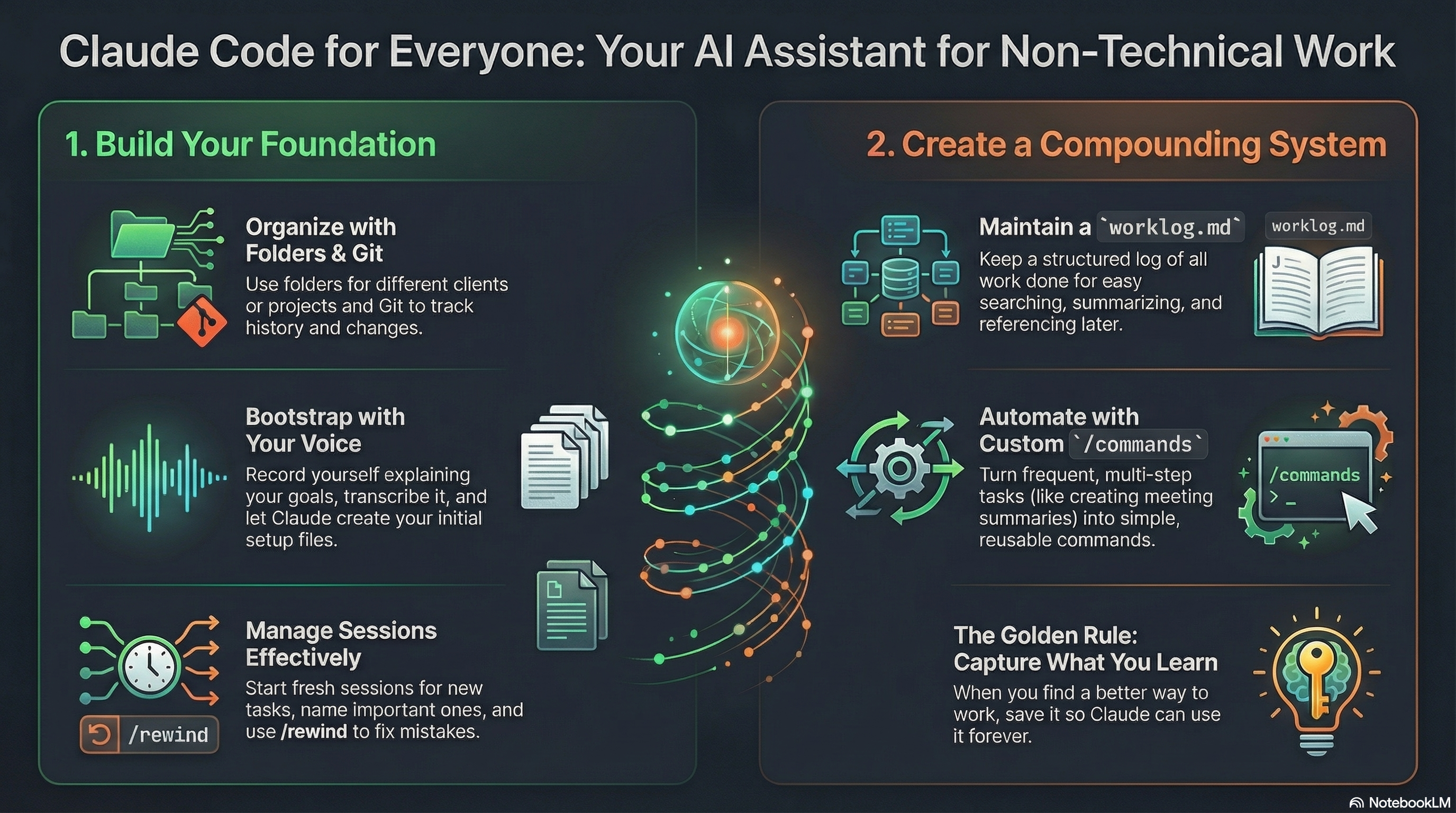
Organize your work into folders. For me, folders represent different clients. I also have a folder for my own consulting business and a personal folder for things that don’t fit elsewhere. Underneath each client folder, I have subfolders for meeting agendas, meeting summaries, and individual projects. Use whatever structure matches how you think.
Use git to track changes. You can throw things away when Claude goes off track - it has a /rewind feature, but commit history gives you more flexibility. Claude is also good at reading git history and using git diff to understand changes. When I’m working on something, I’ll often ask it to look at the history of a specific file, and it uses that to understand the current problem. Commit messages can describe completed units of work, and Claude uses those messages when making decisions later. If you’re non-technical, don’t let git intimidate you - it’s not that complicated, and you can ask Claude Code to help you set up a repository. You don’t need to know git commands to benefit from version tracking.
Bootstrap your CLAUDE.md by talking. When you’re starting fresh, record yourself describing how you intend to use the repository. Use Apple Voice Memos or whatever you have. Be verbose - talk about project tracking, to-do lists, document templates, whatever you’re trying to accomplish. Don’t worry about structure.
Once you have a transcript, put Claude Code in plan mode and ask it to review the transcript, then use its AskUserQuestion tool exhaustively to clarify how you want the system to work. Let it ask questions until you’re satisfied it understands your intentions - you’ll probably have to tell it to stop, because it will keep asking if you told it to be exhaustive. Then have it generate a CLAUDE.md file from that conversation. You’ll have something workable to start with.
This voice-to-transcript pattern is one of the most useful techniques I’ve found for working with Claude Code. I use it constantly - not just for bootstrapping CLAUDE.md files, but for meeting summaries, project kickoffs, brain dumps, even drafting emails. Talking is faster than typing, and you capture nuance and context you’d otherwise leave out. Record yourself, transcribe it, then let Claude turn that raw input into structured output. It’s become a core part of how I work.
Create nested CLAUDE.md files for subfolders. If your folder structure has meaning - like folders representing different clients - you want specific instructions for each one. Client-specific stakeholders, communication preferences, key projects. You can use the same voice-transcribe-plan process to create these.
Session Management
Start new sessions for different units of work. If you’re starting a new project and want to create a requirements document, use a fresh Claude session. Don’t let unrelated work bleed together unless you want Claude to have that shared context.
Never clear sessions - always exit. You can resume sessions later by typing claude --resume, which shows your conversation history. I regularly return to previous conversations to continue work, summarize what I did, or pull out information that only exists in that context window. If you clear a session, that context is gone.
Name sessions you’ll return to. Use /rename to give sessions meaningful names. When you resume, you can use the name directly instead of scrolling through a list.
Use /rewind when things go off track. If Claude starts deviating from what you want, type /rewind and choose which message to restart from. It rewinds both the conversation and any file changes. This means you don’t have to overthink every message - you can always back up.
Always use plan mode first. Before having Claude execute anything, put it in plan mode and let it ask questions about what you’re trying to accomplish. It’s faster than going back and forth later.
Avoid long sessions that hit context limits. If you compartmentalize your work into focused sessions, you won’t have to worry about automatic compaction. I rarely self-compact - I just exit and start fresh when the work changes.
Building Systems That Compound
Put a todo.md in each project folder. I have instructions in my CLAUDE.md describing how I want the to-do system structured - in progress, backlog, and completed with dates. The completed section includes sub-bullets describing what was actually done. Claude can read these files and use them later. I can ask “give me a summary of everything I did last month” and it pulls from my to-dos and git history.
Create a /command for committing changes. I have a /commit-changes command that looks at uncommitted files, infers from the changes and session context what happened, and generates a commit message in my preferred format. After working on something, I just type /commit-changes and it handles the rest.
Maintain a work log. This is one of the most useful things I do. I keep a worklog.md at the top level of each client folder - not per-project, but one log for everything related to that client. It captures meta information about work I’ve done: dates, category, subject, summary, related files, and key points. My /commit-changes command appends to this file automatically.
If you capture what you did in a structured way, Claude can use that information later. Need to write a status update? Claude reads the work log. Want to remember why you made a decision three months ago? It’s in the log. The work log becomes a running record that Claude can query, summarize, and reference.
Update your CLAUDE.md from sessions. At the end of a session where I’ve done something I might want to repeat, I ask Claude to review the conversation and suggest updates to my system instructions. I have a /update-from-session command that uses AskUserQuestion to clarify what specifically should be captured. Be selective - you don’t want to pollute your CLAUDE.md with noise.
Turn useful sessions into /commands. Sometimes the work is significant enough that it deserves its own command rather than just updating CLAUDE.md. For example, I have a /meeting-summary command - I record myself describing what happened in a meeting, and it turns that into a structured summary. I’ve even created a /command-from-conversation command that helps turn an interactive session into a reusable command.
Put templates in separate files. If you have specific formats for things like project descriptions or meeting notes, create separate markdown files for those templates. Reference them from your CLAUDE.md or /commands. This keeps your instruction files from getting too large and lets Claude load templates on demand.
Working with Files
Use @mention when you need specific files. Claude is generally good at finding relevant files on its own, but if you want to guarantee it reads certain files, type @ and it will autocomplete. I use this frequently when referencing project descriptions or previous meeting notes.
Let Claude write code, even for non-technical work. If you’re analyzing a CSV or processing text, Claude will often write Python to solve the problem. You don’t need to fully understand the code - just approve it and check the results. If something works well, tell Claude to save it as a reusable script.
Consider a mono repo. I put all my non-technical work into one repository. There’s no great pattern that I like yet for sharing /commands across repos, and having everything in one place makes cross-project work easier. You can mount other folders if needed, but I haven’t found a strong need to.
The Compounding Effect
The underlying idea behind all of this: build systems where information compounds. Every document you create, every commit message you write, every /command you build becomes context for future work. Work logs, git history, CLAUDE.md files - all of it is accessible to Claude later.
When Claude can read your previous meeting summaries, your project history, and your documented preferences, it produces outputs that actually match what you want. Chat interfaces start fresh every time - this doesn’t.
One thing I’ve learned: whenever you discover something through a Claude Code session about how you want the system to work, store it somewhere - your CLAUDE.md, a /command, the work log, a commit message. If it stays only in the conversation, it’s lost when the session ends. If you capture it, Claude can use it forever.
Things Worth Exploring
I’m not using these much yet, but they’re capabilities I’m aware of and have experimented with. I just haven’t needed to pull them into my workflow:
MCP integrations. Model Context Protocol lets Claude interface with external systems - your Postgres database, Notion, Gmail. The tradeoff is that MCP connections often use a lot of tokens and can pollute your context window. An alternative is having Claude write code to interface with these systems directly, which saves on context - I prefer this route when needed.
Prompt completion. Claude Code now suggests what you might want to do next. Press enter to run the suggestion or tab to edit it. I’ve been surprised by how relevant they sometimes are, but generally like to describe what I want myself.
Skills. These are packaged, portable instructions for specific workflows. Anthropic has a skills directory, and people are building and sharing their own. I haven’t built custom skills yet since /commands work well for me, but I might convert some of my more elaborate workflows to skills eventually.
Desktop and mobile apps. You can move sessions between CLI and mobile. People are doing real work from their phones now. I think this will be a great UX for more async work.
Permission auto-accept. You can configure Claude Code to automatically approve certain commands instead of asking each time. Useful if you’re running multiple sessions and the permission prompts slow you down.
Hooks. You can attach instructions to specific events - for example, triggering actions after certain files are written.
Subagents. Claude can spin up subagents with their own context windows that run in parallel and return results without polluting your main context. I’ve seen Claude do this on its own.
Plugins. These bundle commands, skills, hooks, and MCP servers into installable packages. People have built specialized plugins for different workflows.
Resources
There’s a lot of content out there about Claude Code, but these are links I think are worth your time if you want to dig in further:
- Advent of Claude 2025 - 30 tips from Anthropic’s developer relations
- Lenny’s article on Claude Code for non-programmers - Covers installation and use cases sourced from this Twitter thread
- Anthropic’s Claude Code course - 15 lectures in about an hour, covers 80% of what you need
- Boris Cherny’s thread - The creator of Claude Code on how he uses it (more technical)
- Claude Code documentation - The official docs with getting started guides and examples
Getting Started
The patterns I’ve described here took months to develop, but you don’t need all of them to get value. Start with one folder, one CLAUDE.md file, and one problem you want to solve. Record yourself describing what you’re trying to do, let Claude ask you questions, and see what happens.
What I’ve found is that these tools reward ambition. Every time I think “Claude probably can’t handle this,” I’m wrong. The system I’ve built now would have seemed implausible when I started - but it emerged naturally from trying things, capturing what worked, and letting it compound.
I’m curious what’s working for you, or what problems you’re trying to solve. The patterns that work for consulting might look different for other kinds of knowledge work. But the underlying approach - build systems that compound, capture what you learn, let Claude read your history - that transfers everywhere.
If you’ve been waiting to try this, stop waiting. Pick a real problem and point Claude Code at it. You’ll figure out your own patterns faster than you expect.