How I Use Modal
I’ve been using Modal in my consulting work for a while, and it’s become my favorite piece of infrastructure. It keeps the infrastructure code small and lets me focus on the application. After listening to a recent Latent Space episode with Modal’s CTO, I realized I’d never written down how I use it.
For those unfamiliar: Modal is a serverless platform for Python. You decorate ordinary functions with infrastructure configuration, define your dependencies in a Dockerfile or declaratively in Python, and Modal runs the functions in its cloud. Scheduling, scaling, HTTPS routing, and log capture are all handled for you.
The same problems come up often: Python data pipelines, a warehouse, internal tools, and AI jobs. Modal can handle individual pieces or most of the cloud layer. Below are two generalized patterns from that work:
- A scheduled ingestion service. Every morning it pulls report data from a third-party vendor’s API and lands it in Snowflake. It isn’t the only feed into the warehouse, but the others load outside Modal, so I’m leaving them out. On Modal this is one function, about 60 lines of infrastructure code total.
- An internal data platform. A Streamlit web portal with dashboards built on Snowflake data, AI agents that generate long-form reports as background jobs, and an MCP server that exposes the same data tools to Claude and ChatGPT clients. Five Modal functions plus on-demand sandboxes, all built from one container image.
I don’t run Kubernetes or Terraform for any of this. The only consoles I touch are Modal’s dashboard and Snowflake. Each of these deploys as a dev and a prod copy from the same file, using an environment suffix on every named resource.
One thing to know up front: this isn’t Modal’s main use case. Modal is best known for GPU workloads (model inference, fine-tuning, large parallel batch jobs) and for sandboxed code execution inside AI agents, which is most of what that podcast episode covers. I’m using it as general-purpose infrastructure: cron jobs, web hosting, background work, storage, networking. It handles that kind of work really well too.
The features
Functions
Everything on Modal is a function. Each one declares its own resources (CPU, memory, timeout, concurrency) as decorator arguments, and can be triggered by a cron schedule, an HTTP request, or a call from other Python code. All the functions in a project share one container image, which Modal builds from the repo’s Dockerfile. The infrastructure configuration lives in the same Python files as the application code, in the same git history.
Cron schedules
The entire ingestion service is a single function with a schedule attached:
@app.function(
    secrets=[modal.Secret.from_name(SECRET_NAME)],
    schedule=modal.Cron("0 6 * * *", timezone="America/New_York"),
    proxy=modal.Proxy.from_name("egress-proxy"),
)
def pull_reports_scheduled():
    from myproject.pipeline import pull_reports
    return pull_reports()
Modal runs it every morning, and the logs and run history show up in the dashboard. When I need a backfill, I trigger the same function manually with one CLI command. This job used to be a GitHub Actions cron, and Modal has been easier to live with: the job runs in the project’s own container image instead of a runner that gets set up from scratch on every run, and it gets the static egress IP described below.
Secrets
A Modal secret is a named bundle of key-value pairs. You create it in Modal’s dashboard and it gets injected into the container as environment variables at runtime. Each project has one secret per environment holding warehouse credentials, vendor API keys, LLM provider keys, and OAuth config. Application code just reads os.environ, and it works the same on my laptop (where the variables come from a git-ignored .env file) as it does in the cloud. Nothing sensitive lands in the repository.
Volumes
Volumes are network filesystems that mount into containers and survive between runs. I keep all the data platform’s non-warehouse state on them: a SQLite database for job tracking, parquet snapshots of every dashboard dataset, fetched source material for the report jobs, generated reports, self-contained HTML tools, and OAuth token state. The one rule is that syncing is explicit: writers call commit() when they’re done, and readers call reload() before reading. In exchange you get durable storage without setting up a database or object store.
Static IPs
Serverless containers normally get arbitrary outbound IPs, which breaks anything that enforces an IP allowlist. Attaching proxy=modal.Proxy.from_name("egress-proxy") to a function routes all its outbound traffic through a managed tunnel with one static IP. Everything in this post shares a single proxy, so the warehouse and the vendors only have to allowlist one address. This lets Modal work with strict network policies.
Web endpoints
Modal can give a function a stable HTTPS URL in two ways, and I use both:
@modal.web_serverwraps any process listening on a port. The Streamlit portal runs this way. The function starts Streamlit as a subprocess, and Modal routes HTTPS traffic to it (including the WebSockets Streamlit depends on), keeps a container warm while sessions are active, and scales to zero when idle.@modal.asgi_appserves an ASGI application directly. The MCP server (a FastMCP app behind an OAuth flow) and a small sidecar that serves HTML tools both run this way.
The portal is just Python running in a container, so it isn’t limited to showing precomputed data. While someone is using it, it can make live API calls to whatever it needs (LLM APIs, the warehouse, vendor services), all through the same static-IP proxy. The morning ingestion is batch, but the data platform isn’t.
A note for Snowflake shops: Snowflake owns Streamlit, and you can host Streamlit apps directly inside Snowflake. I run them on Modal instead, mostly for cost. An app hosted in Snowflake keeps a warehouse running whenever someone is using it, which adds up fast for an internal tool that’s open all day. The parquet cache on the volumes is the other half of the same decision: most of the dashboard data changes once a day, so the portal reads parquet files from a volume and only queries the warehouse when a cache is stale or missing. It’s a slightly odd setup, but reads are faster, the warehouse spends most of the day suspended, and the Snowflake bill stays small.
About those HTML tools: some internal tools are easiest to build as a single self-contained HTML file, with the JavaScript and CSS inline, rather than as part of the Streamlit app. The sidecar is how those stay behind the platform’s login: the files live on a volume, and the portal hands a logged-in user a short-lived signed link that opens the tool in its own browser tab. It’s an easy way to slot static HTML tools into the platform without separate hosting or a second login.
Each endpoint has its own auth: OIDC browser login for the portal, OAuth for MCP clients, HMAC-signed URLs for the tools sidecar. “Serverless” on Modal covers full interactive web applications, with login flows, WebSockets, and long-lived sessions.
Calling functions from code
Any deployed function can be called from other Python code by name. I use this for two things.
The first is synchronous, as a deploy hook. My deploy command runs modal deploy and then immediately calls Function.from_name(APP_NAME, "warm_cache").remote(), which pulls every dashboard dataset from Snowflake into parquet files on the cache volume. Every deploy ships with a fresh cache, and there’s no schedule to maintain.
The second is asynchronous, as a job queue. Users submit AI report-generation jobs that run for many minutes, way too long for a web request. The web app fires them off and polls:
# submit
call = modal.Function.from_name(APP_NAME, "run_agent_report").spawn(params=...)
db.record_job(call.object_id, status="running")

# poll, on each page refresh (call_id comes from the db)
try:
    result = modal.FunctionCall.from_id(call_id).get(timeout=0)
except TimeoutError:
    pass  # still running
spawn() returns a durable call ID immediately. get(timeout=0) raises while the job is still running and returns the result when it finishes. Combined with a SQLite table on a volume, that’s the platform’s entire background-job system. I didn’t have to set up a broker or a worker fleet.
Sandboxes
Sandboxes are containers you create on the fly from code, without deploying anything first.
Here’s how I use them. My project CLI has commands that run AI agents, and some of them run for half an hour. This is where the more experimental work lives: agents I’m still iterating on that haven’t been integrated into the core code yet, and bespoke jobs that don’t need a place in the web UI. Run locally, they die if the laptop sleeps. So the CLI has a --remote flag: instead of running the agent on my machine, it creates a Modal sandbox from the same Dockerfile image, runs the exact same command inside it, and streams the output back to my terminal so it looks like a local run. When the job finishes, the CLI copies the result files down to my machine and shuts the sandbox down.
Unlike the deployed functions everywhere else in this post, nothing here is registered ahead of time. A sandbox runs whatever command you give it, so a new CLI command needs nothing deployed or registered on Modal’s side before it can run remotely.
How it fits together
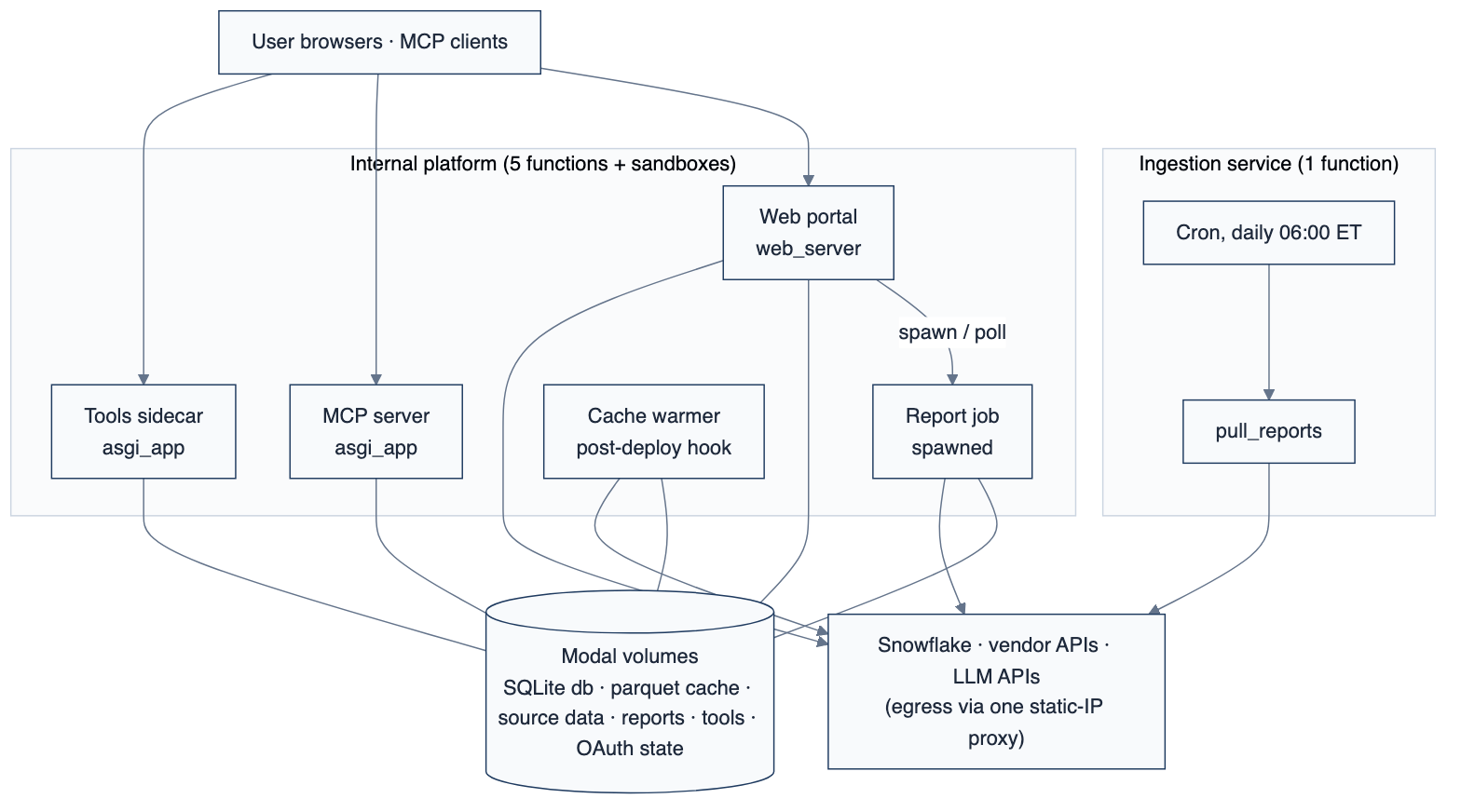
Secrets and the shared image apply to every function. Volumes and the proxy only attach where they’re needed. The warehouse’s other data feeds load outside Modal and aren’t shown.
When this makes sense
Across these patterns, Modal covers scheduled batch jobs, an interactive web application, API endpoints with auth, background AI jobs, persistent storage, static-IP networking, and one-off remote runs. All of it is decorators and name lookups in ordinary Python repositories. No single project needs the whole list, but the same pieces keep coming up because the problem space is the same. There’s also a lot of Modal I don’t use, or don’t use yet. I don’t need GPUs because inference happens through LLM provider APIs. Modal has built-in queues and container fan-out that I could be using for background jobs, but so far a thread pool and a SQLite table on a volume have been enough. That’s how the platform works in practice: you pull in the pieces you need, everything else is Python you write yourself, and the built-in versions are there if you outgrow your own.
On cost: you can start for free. Modal’s free plan includes $30 a month in compute credit, which is enough to experiment and get a feel for the platform. You could genuinely run some small infrastructure without paying anything. The paid plan jumps to $250 a month, and a few features in this post are gated behind it, including the static IP proxy and unlimited cron schedules (the free plan caps you at five). So in practice, if Modal works for you, expect to pay $250 a month. That includes $100 a month in compute credit, and if you design your system prudently, that credit gets you really far.
If you’re building Python systems with a data warehouse behind them, this covers most of what you need from an infrastructure platform, and one person or a small team can operate all of it. The reason I like Modal comes down to simplicity: the infrastructure is just code in the same repo as the application, so I’m never really working outside the project. It’s well documented, the defaults are pragmatic, and most of the decisions infrastructure usually forces on you are already made. I get a lot done without doing a lot of work. Start with something small, like a cron job you’re currently running on GitHub Actions, and see how it feels.